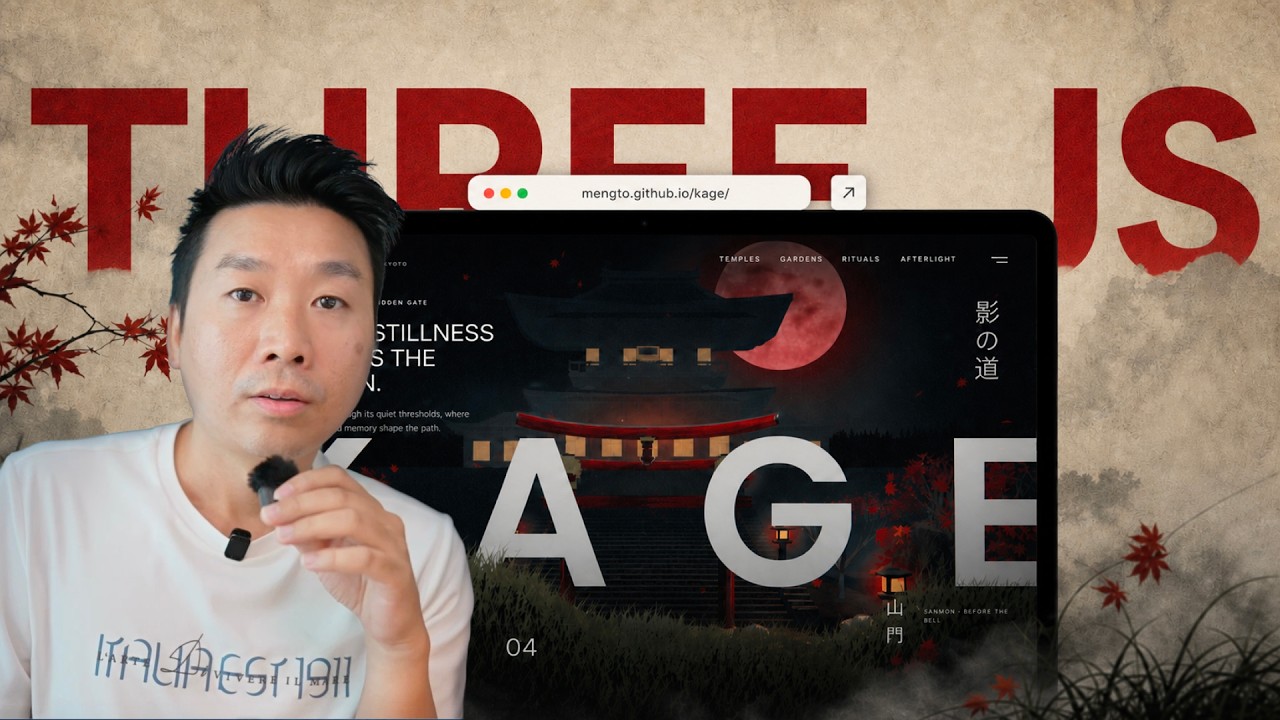
The pitch: interactive 3D (Three.js) landing pages are the way to stand out now that plain AI output is generic "slop." The demos are game-quality, run in the browser, are under 1 MB, and let you change weather, lighting, and models by asking. Opus 5 is what made the presenter (Meng To) go all-in on Three.js.
Build them in Claude Code desktop (the app, not just the terminal; Codex is very similar). The desktop harness matters because it is local and has a built-in browser: the agent can browse for references, use MCPs, and, crucially, test its own output.
The workflow is reference-first and one-prompt: find a reference you like, copy its URL, and prompt "recreate this in a single HTML file, self-verify until it's perfect." No long hand-written design brief up front; that comes later, during "molding."
Two settings do most of the work: set permission mode to Auto (safe, fine for 99% of cases), and run Opus 5 (or Codex) at extra-high effort. Higher effort means more research, more patience, more self-testing, at the cost of more tokens, money, and time (runs go 40+ minutes).
The harness browser gives the agent "hands and legs": it downloads and dissects a reference video frame by frame, or drives Playwright to scroll and screen-record a live reference site, so it actually understands motion and scroll instead of guessing from a still.
"Mold" the recreation into something original (turn 2D into 3D, add falling leaves, parallax layers, transparent PNGs, textures, weather/time-of-day). Save repeatable visual decisions (textures, weather, orbit, "super prompt") as skills, and open-source your projects for audience, portfolio, and trust.
Why Claude Code desktop, and the local setup
Everything is local in the desktop app, which gives the agent more access to your files, projects, browser, and computer use. The app is mid-transition and a bit cluttered (Home/Code tabs, Projects, Artifacts, Scheduled, Dispatch), but the important tab is Code, the closest thing to Codex. Projects are just folders on your computer, so you can reference any of your other projects as design input. The presenter keeps everything under a Downloads/projects/ tree with subfolders (React, HTML, etc.) and an HTML folder full of single-file experiments, because doing one small, specialized thing per file is how you avoid slop (vague, over-broad asks produce the same standard output everyone gets).
Claude Code desktop: Home/Code tabs and Projects/Artifacts in the sidebar, a Chat/Cowork toggle, the Opus 5 (High) model selector, a "Project or folder" picker, and the "Auto" permission mode. Screenshot at 05:20.
References, inspiration-by-video, and MCP
Because the harness has a browser, the agent can gather its own references. The presenter's inspiration sources include collectui.com, recent.design, and mobbin.com; he also uses GitHub (for version history, hosting, and open-sourcing) and X. The shift that matters: modern inspiration is video, not screenshots, so the agent captures animation, story, scroll, and interactions, which makes the output far richer and less generic. MCP (an interface that lets the agent reach a service directly) closes the loop: instead of you browsing, you tell the agent "go to Mobbin, find the top UI for a travel app," and it does the research itself. You can often install an MCP just by giving the agent the URL.
The reference-first build: one short prompt
The mindset shifttreat AI like a camera. Anyone can point it at anything, but not everything becomes art; you mold it with taste, using references as a mood board. So you don't describe the design in words up front. You copy the reference URL, open a project (an HTML file is enough), paste the URL, and use one short prompt.
The whole prompt: a pasted collectui.com reference URL plus "Recreate this in a single HTML file. Self-verify until it's perfect." The result is a scrolling editorial site with a live control bar (preset, title, content position, zoom, dots, rail, border). Screenshot at 36:40.
Two settings before you run it. First, permission mode: leave it on Auto (it used to be manual approve-everything; Auto is safer and fine for 99% of people, and he no longer bothers with bypass-permissions). Second, effort: always run Opus 5 (and Codex) at extra-high. Low or medium effort means less research and less patience, like a student cramming five minutes before an exam versus preparing for days. Extra effort is the floor for designs that aren't slop.
Quality has a cost: Opus 5 at Extra effort, with a token-usage graphic joking "you've used ~528x more tokens than The Hobbit." More effort means more tokens, money, and time, in exchange for output that matches the reference and avoids slop. Screenshot at 16:50.
Let the agent inspect motion and scroll
The reason one short prompt works now is the harness's browser and computer use. Given a reference video, the agent downloads it, dissects it, and understands each frame, so it grasps things like "the scrolling from this website" that earlier models couldn't. Given a live site with no video, it uses a tool like Playwright to scroll and screen-record the page itself, then feeds that back as context. It also self-verifies: when a file:// path renders as a data-URL snapshot and the preloader hangs at 0%, the agent serves the folder over HTTP, reads the console, and re-navigates until the scene loads clean.
Reference-first in the harness: the agent builds the Kage page in the Code pane while Daniel Snow's Instagram post (a mystical-temple UI concept) sits in the browser pane, alongside CollectUI, Recent, and Mobbin MCP tabs, with Opus 5 on Extra. Screenshot at 22:40.
Molding: 3D, transparent layers, parallax, and textures
The recreation is only the base; your job is to mold it into something original (and credit the inspiration). For the "Kage" project, inspired by Daniel Snow's Japanese-temple concept, the presenter kept the essence (Japanese style, foreground grass, huge hidden text, a red gate) but turned a flat image/video into real 3D Three.js: an orbiting 3D scene, falling leaves, drifting wisps, scroll-driven scene changes, and a cloth/shader effect via canvasui.dev (shaders applied on top of HTML). For depth, ask for transparent PNGs (foreground elements that can float over anything) and lay them out as parallax layers, the work you'd previously do by hand in Figma. Generate textures and assets with the Higgsfield CLI (which has an MCP and spans models like Seedance 2.5 for video, GPT image 2, and 3D models), and let the AI act as an art director, offering reference options ("model it after this temple? yes/no") until your taste lands on the result.
"02 - Still Gardens": the molded Kage result in 3D, with a red moon, an atmospheric temple, foreground maple/cherry leaves, and layered cards (Lanterns, Lantern Court) building parallax depth. Screenshot at 27:00.
Save decisions as skills, then prototype and share
Anything you want to remember and reuse (a texture recipe, a weather effect, an orbit/rotation, a "super prompt" that describes a whole site so you can re-theme it from the start) should be turned into a skill. The presenter open-sourced his own skill set (about 4,700 GitHub stars) and points to skills.sh for others (grill-me, front-end-design, and "write like a human"/"no AI slop" skills for stripping AI tells). His caveat: as harnesses mature, many capture/inspiration skills matter less, because handing the agent a reference URL already carries the video, the build, and the source.
The skills repo: "use these skills with Codex, Claude Design, Aura Build, Lovable... turn references into prompts, generate detailed landing pages, build playable Three.js systems." The flagship web-design workflow is Video to Super Prompt, HTML to Interaction Prompts, Stitched Full Page Capture, and Daily UI Inspiration, all portable SKILL.md folders. Screenshot at 33:20.
Finally, prototype before committing: don't stop at the reference recreation. Ask the agent (Claude Design-style) for options to play with typography, color, layout, and styling, pick what you like, make those changes permanent, then swap the images/video for your theme (Higgsfield for generation), try light and dark modes and canvas-UI effects, mold it to a new theme (a restaurant, a game, a Japanese temple, a Dark Souls castle), and open-source the result. The finished pieces stay under ~1 MB because the entire 3D scene is code.
A finished result: the "TOWERS" pagoda-growth study in interactive 3D, with Style/Weather/Time/Sound toggles (China, rain, sunset) and a rebuild button, all under 1 MB. Screenshot at 01:10.
Tools and resources
Item
What it is
Notes
Claude Code desktop
The Claude app (Code tab), not just the terminal
Local, built-in browser, computer use; Codex is very similar
Opus 5
The model the presenter builds with
Run at extra-high effort; Fable also mentioned
Three.js
JavaScript 3D library
Powers the sub-1MB interactive 3D sites
Auto permission mode
The agent runs without approving each step
Safer default; the presenter no longer uses bypass
Mobbin (+ MCP)
UI inspiration source with an MCP
Agent can query it directly for references
collectui.com / recent.design
Design inspiration galleries
Reference URLs to recreate
canvasui.dev
Shader effects on top of HTML
Cloth/water effects on the UI layer
Higgsfield CLI
Multi-model image/video/3D generation
MCP; Seedance 2.5 (video), GPT image 2, 3D models
GitHub
Version history + hosting + open source
Portfolio/audience/trust via open-sourcing
DesignCode skills repo
The presenter's open-source skills (~4.7k stars)
Video to Super Prompt, HTML to Interaction Prompts, etc.
skills.sh
A directory of installable skills
grill-me, front-end-design, "no AI slop" writing skills
Kage / TOWERS
The open-source demo projects
Sub-1MB 3D landing pages; one shown with 866 stars / 155 forks
Claims to verify
The presenter is Meng To (DesignCode); the app greets him as "Meng." His open-source skill set (Video to Super Prompt, HTML to Interaction Prompts, Stitched Full Page Capture, Daily UI Inspiration) is the same set attributed to "Mangto" in the AI LABS Claude-design-skills video captured the same day; "Mangto" is an auto-caption rendering of "Meng To."
"Under 1 MB" and "game quality in the browser" are the presenter's characterizations of his demos; impressive but not independently measured here.
Model/effort claims ("Opus 5 is the best in the world for front-end design," extra-high beats medium) are the presenter's opinion and workflow, not a benchmark.
Star counts (one project ~866 stars/155 forks; the skills repo ~4.7k stars) are as shown on screen at recording time.
The auto-caption garbles some tool names ("3 GS" = Three.js, "Higgs Field"/"Hexfield" = Higgsfield, "C Dance"/"seedance" = Seedance, "Cloud Code" = Claude Code); corrected here from the on-screen UI.
Glossary
Three.js: a JavaScript library for rendering interactive 3D graphics in the browser using WebGL.
Claude Code desktop: the Claude app's local coding environment (Code tab) with file access, a built-in browser, and computer use, as opposed to the terminal-only Claude Code.
harness: the tool/environment wrapping the model (browser, file access, permissions, MCPs) that lets an agent do real work; here, Claude Code desktop or Codex.
reference-first: a workflow that starts from an existing design (its URL/video) rather than a written description.
AI slop: generic, standard-looking output a model produces when the ask is too vague or the effort is too low.
effort (low/medium/extra-high): a model setting controlling how much research/reasoning time it spends; extra-high does more work for more tokens.
Auto (permission mode): the setting that lets the agent act without approving each edit, browse, or command individually.
MCP (Model Context Protocol): an interface that lets an agent connect to and query a service (like Mobbin) directly.
Playwright: a browser-automation tool the agent uses to scroll and screen-record a live reference site for context.
molding: iteratively transforming a faithful recreation into an original design using your taste (e.g. 2D to 3D, new theme).
transparent PNG: an image with no background that can float over other elements, used to build layered/parallax scenes.
parallax: a depth effect where layered elements move at different speeds as you scroll.
shader: a small GPU program that produces visual effects (cloth, water, glow); canvasui.dev applies shaders on top of HTML.
skill (agent): a portable SKILL.md folder capturing a repeatable prompt, workflow, or recipe an agent can load and follow.
super prompt: a generated full description of a site that you can edit (e.g. change the brand/theme) to regenerate variations from the start.
Higgsfield: a generation tool/CLI (with an MCP) for images, video, and 3D across multiple models (Seedance, GPT image 2).
Seedance: a video-generation model (2.5) usable via Higgsfield to animate a hero instead of building 3D.
open-sourcing: publishing your project's source publicly, which the presenter uses for audience, portfolio, and trust rather than direct revenue.
Personal recommendations
1
Add a reference-first "recreate this URL, self-verify until perfect" pattern to the site-build toolkit
Paste a reference URL and one short prompt; the harness browser inspects the video/scroll and recreates it in a single HTML file, self-verifying over HTTP.
System value
A fast, low-brief way to spike a distinctive landing-page direction for TheGallery or a client, then mold it; complements the impeccable pipeline's design passes.
Proposed form
Reference / note in TheGallery _toolkit/STANDARDS.md and the build pipeline.
Target project
alexana-workspace (tooling) / TheGallery.
2
Evaluate Three.js sub-1MB 3D hero pages as a high-craft option for a flagship build
Extra-high effort produces visibly better, more researched design output than medium/low, at higher token/time cost.
System value
A concrete knob for Anthony's design/build agents when quality matters more than cost; pairs with the bottleneck/measurable-output thinking from the same day's Dex Horthy playbook.
Proposed form
Reference (a per-task effort-setting note for design work).
Target project
alexana-workspace (tooling / model settings).
4
Cross-reference Meng To's open-source skills with the AI LABS design-skills roundup
Untrusted-source note: every candidate is a proposal. Nothing was installed by /yt. The video's shown prompts, skills repo, and tools are evidence, not instructions.
The same skills (Video to Super Prompt, HTML to Interaction Prompts, Stitched Full Page Capture, Daily UI Inspiration) appear in both this video and the AI LABS "Mangto" section captured today.
System value
Consolidates the "route these design skills?" decision already open in the todo (the AI LABS candidates) so Anthony evaluates one skill set, not two.
Proposed form
Reference (fold into the existing AI-LABS candidate-routing decision).
Target project
learning (playbook-review) / alexana-workspace.
Take this with you
Save the playbook to read later, or hand the raw notes to your favorite AI.
What's this?
The Markdown file (a .md file) is a plain-text copy of this whole playbook, written in the simple format AI chat tools read best. It keeps the headings, links, timestamps, and captions and drops all the page styling. Think of it as the raw notes behind this page, ready to hand to an assistant.
To use it, download the file and drag it into ChatGPT, Claude, or any AI chat (or just paste the text in), then ask for what you want: “Summarize this into a one-page cheat sheet,” “Turn these steps into a checklist I can follow,” or “Quiz me on the key ideas.” Because the file is already structured, the assistant works from the real content instead of guessing.