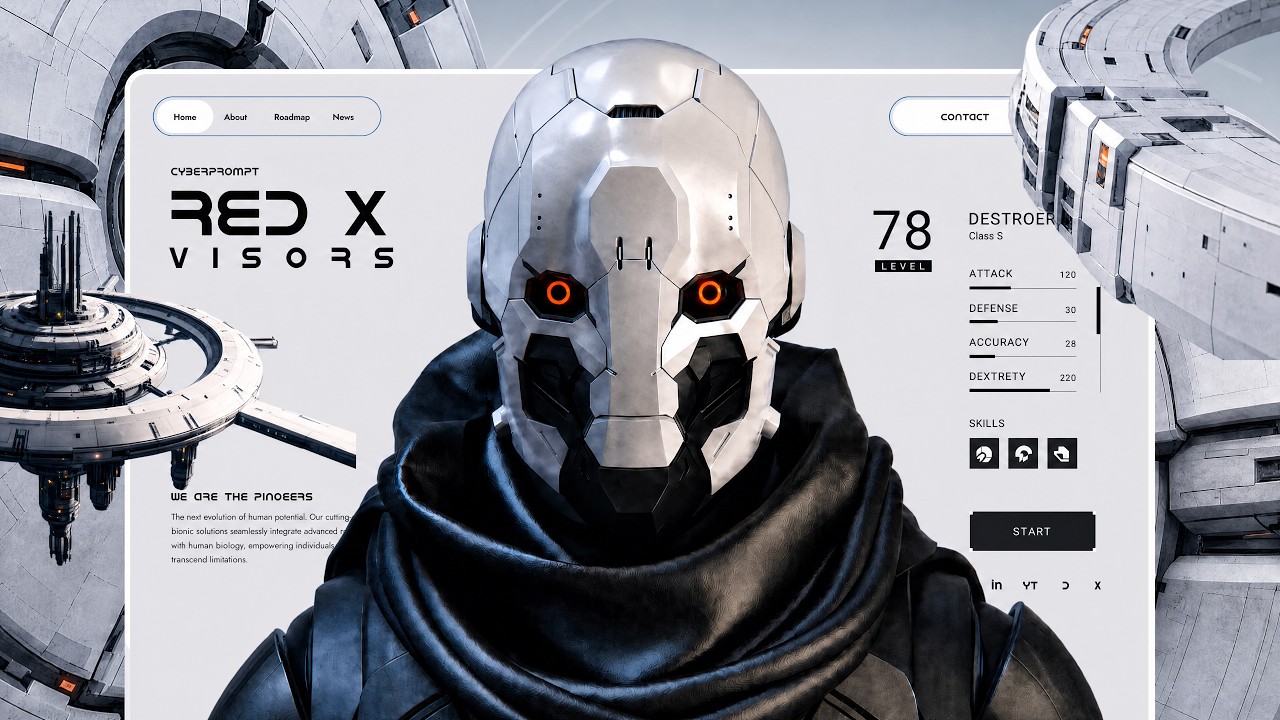
Six full website builds in one video, each chaining an AI image edit (Figma's "GPT Image 2" edit-with-prompt) into an AI 3D-model or video tool, then into an AI website builder (Claude Design, Cursor, Bolt.new, or Figma Make) - no 3D software and no hand-written code at any step.
The creator's own prompt library, motionsites.ai (400+ ready website-section prompts, growing by about five a day), is the recurring shortcut for making AI output look designed rather than generic: paste a motionsites.ai prompt into the builder and say "take the design system, not the content" from it.
Concrete "avoid AI slop" technique, chapter 4: the "four horsemen of the apocalypse" of AI-generated websites (a real, cited tweet by Wes Bos, @wesbos) - orange/purple gradients, wide letter-spacing headlines, glassy gradient cards, stock hero photography - are named on screen as the look to design away from.
Named, concrete tool stack (several resolved on screen even where the narrator mis-spoke or never named them): Figma (GPT Image 2 image edit, Figma Make, community remix, Dark Mode Magic plugin, shader/filter panel), Tripo3D.ai (image-to-3D-model, auto-rig, GLB export), Higgsfield.ai (Seedance 2 video generation), Kling AI (image-to-video), Claude Design (Sonnet 5, Fable 5), Cursor (Grok 4.5, "High Fast" and "Max" modes), Bolt.new.
Figma Make's model picker is shown directly on screen: Claude Sonnet 4.6, Claude Opus, Gemini 3 Flash, Gemini 3.1 Pro, and GPT-5.5 are all selectable backends for design-to-code generation.
Closing business pitch: grow on Twitter/X by tagging bigger accounts on high-quality posts (never tag multiple competitors together, since none of them will repost you if it means promoting the others), and package finished scroll-video assets as a tiered digital product ($9 for a pack of 20, up to $49 for 100).
Chapter 1: An interactive 3D robot hero element
0:00-4:49. First build of the video: an interactive 3D character that visually follows the visitor's cursor, generated from a single 2D reference image with no manual 3D modeling.
The video opens by cutting to one of the creator's own finished projects as proof of what the course can produce - this "Halo S1" headphone site recurs as B-roll throughout the rest of the video. 0:15
Workflow, as narrated and confirmed on screen:
Find a reference image (the creator uses a robot ad image) and open it in Figma.
Use Figma's built-in AI image edit ("Edit with prompt", model GPT Image 2) to turn the reference into a front-facing, full-body pose and strip UI/text elements, then request front/left/back/right views in one image.
Upload the multi-view image to Tripo3D.ai (studio.tripo3d.ai), which converts multi-view 2D images into a textured 3D mesh.
In Tripo3D's rigging tool, select the "v1.0 - Good for Humanoid" AI model (a humanoid rig template) and click Auto Rig to generate a skeleton, then export as GLB (a compact 3D file format).
Drop the GLB into Claude Design (claude.ai, Design tab) and prompt it to make the model follow the cursor - Claude writes the interactive web page around the 3D asset directly.
Original reference image opened in Figma before editing. 1:10Figma's AI image-edit panel. The model dropdown reads "GPT Image 2" - this is the tool the transcript's auto-captions garbled as "GPT image too." 1:25The "unnamed 3D-model site" from the narration is Tripo3D.ai (studio.tripo3d.ai) - its Multi-view Images to 3D tool converts the four-view image into a mesh. 2:15Browsing motionsites.ai, the creator's own prompt library, for a UI style to pair with the 3D asset. 2:38Claude Design's "What should we create?" screen, Sonnet 5 selected as the model. 3:10Tripo3D's rigging panel: pick a humanoid AI model, click Auto Rig, then Export as GLB. 3:40
Visual evidence beyond the narration. Several minutes of this chapter's narrated timestamps (uploading the GLB, exporting, dragging it into Claude) actually show a different, recurring example instead: Claude Design autonomously building a full "Your Robots" browser game interface end to end - reading a reference screenshot, self-generating character portrait images, writing the code, and debugging its own CSS/font issues using its own in-app browser tool. This same clip reappears repeatedly through the rest of the video as proof-of-capability B-roll, independent of whatever the narration is describing at that moment.
Claude Design build log: it generated its own background and portrait images, then reports "Filled the backdrop and 4 roster portraits with your uploaded images." 4:10Same build, later: code view plus the rendered "Your Robots" game UI (Berserker/Destroyer/Warrior/Fighter roster, stat bars). 4:35The finished page opened at localhost, confirming it runs as a real interactive site, not a static render. 4:55
Chapter 2: A scrolling website with an AI-animated video hero
4:49-9:56ish. Second build: instead of a static hero image, the hero section plays a short AI-generated video animated from a reference photo.
Find a reference image on Pinterest and edit it with Figma's GPT Image 2 tool to match a target pose/style ("create the same image as this, the same position of the element... but use this reference image").
Upload the edited image to a video-generation tool (Higgsfield.ai, using its Seedance 2 model) along with a short reference video, and prompt it to "animate this image similar to how this video is animated."
Download the generated video and hand it to Claude with the instruction to use it as the hero background.
Iterate on copy and color in plain English ("make all of the content in this section pure white... make the reserve button pure black").
The recurring "Halo S1" headphone-brand reference image, shown here in Figma - part of the same proof-of-work B-roll thread as Chapter 1's robot example. 5:15The same GPT Image 2 edit tool from Chapter 1, applied here to reframe/recrop the reference image. 6:15Higgsfield.ai's asset library - the creator's uploaded reference images and generated videos live here. Note the site banner promoting "Seedance 2.5" and "Free Seedance 2.0 4K": this is the tool the auto-captions mangled into "HFY" and "students 2.0." 7:25Same recurring B-roll thread: a "Halo S1 scroll-scrubbed WebGL hero" project being built in Cursor, opened live at localhost. 8:40Higgsfield's actual output for the technique this chapter narrates: a still photo animated via Seedance 2, prompted directly against a reference video. Detail panel confirms Feature: Seedance 2, 1080p. 9:15
Chapter 3: A full AI-car-company site, built live in Cursor
10:33-22:13. The video's first ground-up marketing site, built entirely inside Cursor using the Grok 4.5 High Fast model, for a fictional car brand ("AERA", tagline "Autonomy, Engineered" / "Form Follows Intention").
Start from a plain prompt describing the company and section count; Cursor's Grok 4.5 model produces a functional but generic first draft.
Paste in a motionsites.ai prompt and instruct the model to copy its design system (fonts, structure, styling) while keeping the site's own copy and section order unchanged.
Layer in video backgrounds with the CSS mix-blend-mode property set to exclusion, so a video composites naturally over other content without a plain rectangular crop looking pasted-on.
Pull additional background imagery from design-inspiration sites (the creator names x.ai, xAI's homepage, as one source) and ask Cursor to apply it directly to a section.
Iterate structurally in plain English: remove a redundant section, swap section order, center-align a block, remove default AI-added borders/strokes, add a stat card row, and check the live mobile-responsive preview.
Finally, ask Cursor (in Max mode, a higher-effort setting versus the default "High Fast") to build out the site's remaining sub-pages (Model, Experience) using the same established design language.
Cursor's starting screen for this build. Model: Cursor Grok 4.5 High Fast. 10:45The AERA site after the motionsites.ai design-system prompt was applied - fonts, layout, and hero copy visibly upgraded from the plain first draft. 11:55x.ai's own marketing site, browsed as one of the reference sources for background assets and section styling. 12:30A later AERA section after further iteration: centered copy, no stray borders, an abstract animated car-shape graphic. 16:00Checking the mobile layout live in Cursor's preview pane - the creator repeatedly checks responsive behavior after each edit rather than at the end. 17:00
Chapter 4: A fintech interactive site that avoids "AI slop" (Bolt.new)
22:42-27:49. Built in Bolt.new, this project is framed explicitly as an exercise in avoiding the generic "AI-generated" website look.
The reference point named on screen is a real, viral tweet: designer Wes Bos (@wesbos) posted "the four horsemen of the apocalypse" naming four AI-website tropes (orange/purple gradient backgrounds, extra-wide letter-spaced headlines, glassy gradient cards, generic stock photography) - a tweet with 1.4K reposts and 21K likes at time of capture. The creator's fix is the same one used throughout the video: paste in a motionsites.ai design-system prompt rather than let the model default to its own style.
Prompt Bolt.new for a plain "mobile-friendly bank hero section" first, to show the generic baseline result.
Layer in a 3D, mouse-reactive card carousel (five rotating bank cards with video-texture faces, metallic chip SVGs, and parallax tilt on hover) as the interactive centerpiece of the hero.
Turn on Bolt's "connector shaders" toggle to add hover-triggered shader effects to the cards.
The real source of the "four horsemen" reference: a tweet by @wesbos, 1.4K reposts, 21K likes, 2.8M views. 23:59Bolt.new's build plan for the plain, unstyled baseline: "Configure Tailwind with custom fintech theme," "Building hero section." 24:25The plain baseline result before any motionsites.ai styling is applied - exactly the generic look the "four horsemen" tweet critiques. 24:51The styled version's real build plan: a 3D card carousel, mouse-parallax tilt, volumetric card thickness, split into a separate CardCarousel component. 26:00
Chapter 5: A masked-video portfolio site ("Prisma")
27:49-31:17. A site design referencing a real Awwwards-featured site, using a still-to-video animation plus a Figma masking trick to make body text appear to sit "behind" a moving video layer.
Browse Awwwards for inspiration; the reference cited on screen is 21hrs.space, an Apollo-11-themed scroll site where a giant "MOON" wordmark sits masked behind a lunar-surface image.
Find and edit a moon reference image, then animate it in Kling AI with an explicit, constrained prompt: "Animate this. Make it spin. Make the spinning noticeable. Don't change the position or size. Make it looped." Constraining position/size keeps the animated asset alignable with fixed text later.
Build the hero in Bolt.new with the animated video at 100% opacity, no overlay.
To make the "text behind video" effect: in Figma, draw a rectangle over the headline, then ask the AI to "subtract" it from the shape sitting on top - the resulting negative-space mask, exported as SVG, tells the website AI exactly where to cut the video layer so type appears to sit behind it.
The actual Awwwards reference site: 21hrs.space, "Navigate the lunar surface and explore the 21 hours that defined humanity's first Moon landing." 27:49Kling AI (kling.ai), Video Generation tab, the exact constrained animation prompt used on the moon asset. 29:19The finished "Prisma" hero: worldwide network of visual artists/filmmakers, moon backdrop at full opacity. 30:40The rectangle/ellipse-subtract masking technique in Figma: a shape is subtracted from another to create the negative-space mask that hides text behind the video. 31:03
Chapter 6: Figma's own AI tooling, a closer look
31:17-44:47. A dedicated section on features built directly into Figma, demonstrated across several different in-progress client projects (a logistics site for "CargoxGroup," a travel site called "Travel.In," and others), not a single continuous build.
Native animation ("Animate this"): select any element, click the animation icon, and ask Figma's AI to animate it - Figma generates a preview with an adjustable duration, from simple reveals to parallax-style layered motion.
Community remix: right-click an element and choose "Find similar designs" to search Figma's community library from that specific visual style; full community files can be opened, and sections copied between unrelated templates to combine ideas (the video's example: a travel site's second section swapped into a different hero).
Prompt-based photo edit: the same "Edit with prompt" panel from Chapter 1 (GPT Image 2) can do a full day-to-night lighting conversion on a photo.
Dark Mode Magic: a community plugin that auto-converts a light-themed page to a dark-themed variant in one click.
Figma Make: Figma's design-to-code feature - point it at a static design and it writes and runs the actual working site, with a model picker exposing several real backends.
Shader/filter panel ("shatter"): a library of generative visual filters, applicable to images, text, and video layers alike - Pattern refraction, Hatching, Color adjust, Gradient map, Bloom, Warp, Colored edges, Chromatic metal, Bokeh blur, Gooey merge, Pixelate, Dither.
Figma's built-in Motion panel (Beta), timeline-based animation editor for a feature card element. 32:10"Find similar designs" inside Figma's image context menu, on a logistics-company ("CargoxGroup") hero image. 33:10The day-to-night prompt-edit technique demonstrated on the logistics truck hero rather than a car - same GPT Image 2 tool as Chapter 1. 34:34Dark Mode Magic applied: the same page automatically restyled with a dark background and light text. 34:54Figma Make starting a design-to-code build directly from a Figma frame. 37:20Figma Make's real model selector for design-to-code generation, on a "Travel.In / Explore" build. This resolves the transcript's vague "let's try using Gemini Flash" into the actual full model roster Figma Make exposes. 39:00A dark/light mode toggle built as a real interactive component and wired up in Figma's prototype view. 42:37Figma's shader/filter library (by Figma): Pattern refraction, Hatching, Color adjust, Filter presets, Gradient map, Bloom, Warp, Colored edges, Chromatic metal, Bokeh blur, Gooey merge, Pixelate, Dither. Hatching's tooltip: "Create hatching effects for text, shapes, and images. Adjust directly on canvas for density, spacing, and shape." 43:41Confirms the filters work on video layers, not just static images: "Add cinematic bloom and glow to images, with on-canvas controls for region, intensity, softness, and color," applied to a 1782x1002 video. 44:38
Chapter 7: The flagship build - a scroll-scrubbed animated site (Cursor + Fable 5)
44:47-53:23. The video's final and most technically detailed build: a minimalist "portfolio agency" one-pager whose hero video plays back frame-by-frame tied to scroll position rather than to time (a "scroll-scrubbed" video background), built in Cursor with the Fable 5 model.
Search Pinterest for a matching asset concept ("abstract 3D forms hanging with white cable").
Generate the actual asset video in Higgsfield.ai (Seedance 2), with a highly specific motion prompt: cable tops stay fixed, bottom ends extend and lengthen while twisting clockwise, camera follows the gold tips, cables shrink and converge into a ball shape.
Pull font styles and section styling from a motionsites.ai prompt, as in every prior chapter.
Prompt via voice (Cursor's built-in speech-to-text) as well as text throughout the build.
Build the hero and second section, then apply the video as a scroll-scrubbed background - a technique the creator flags as important for playback smoothness, and offers an alternative for (converting the video to a JPEG frame sequence instead) if scroll-scrubbing a raw video lags on some devices.
Fix opacity and layout issues, then do a final pass swapping in a futuristic display font pulled from another motionsites.ai prompt ("Augmented Sight").
The full technical prompt behind the scroll-scrubbed effect is dense enough to be worth recording verbatim (as captured on screen, condensed): a fixed full-screen video layer sits behind the content at z-0; scroll progress is computed as scrollY / (scrollHeight - innerHeight), smoothed with linear interpolation (lerp) at a 0.12 factor per animation frame; up to 90 frames are pre-extracted from the video into an offscreen canvas frame cache (capped at 960px width) so the visible canvas can draw already-decoded frames instead of scrubbing a live <video> element; a poster image and a live <video> element both serve as fallbacks while the cache is still warming up.
Sourcing the visual concept on Pinterest before generating the actual asset. 46:33The generated asset and its exact prompt: cable tops fixed in place, gold-tipped bottoms extending and twisting clockwise, converging into a ball shape. Feature: Seedance 2. 47:12The complete technical specification for the scroll-scrubbed video technique, as pasted into the build prompt: fonts, global page structure, and the exact scroll-mapping/frame-cache algorithm. 49:55The finished "Two section website design" build: scroll-scrubbed hero video, then "A small selection of projects we're proud of" (Meridian, Halftone, Ledger & Co.). 51:35The motionsites.ai prompt used for the final font/style pass, plus its complete underlying prompt text - loading a specific web font and three named entrance-animation keyframes. 52:40Confirms the model actually driving this final build: Cursor's model selector reads "Fable 5 High." 58:47
Chapter 8: Growing an audience on Twitter/X to find clients
53:23-58:02. A pivot from tool tutorial to client-acquisition advice. The creator states he grew a Twitter/X account to roughly 66,000 followers over about a year, and that it now supplies about 90% of his clients, versus a YouTube channel he says he has run for four to five years.
The core growth tacticpost finished work at high quality (screen-recorded with a tool like CleanShot or Screen Studio), then tag one larger, relevant account in the post. If the post is good enough, that account may repost or comment, exposing the work to their audience. The explicit caveat: tag only one account per post, never several competing companies together - a competitor will not repost or comment on something that would also advertise a rival, so tagging a group kills the chance any of them engage.
A concrete example of the tactic in action: designer @AmirMushich's post ("Prompt for Codex, Inspo credits: @viktoroddy") reached 192.8K views, 1.6K likes, 2.2K bookmarks. 56:22The specific "good quality, well-customized" example: a real tourism microsite for Mostar, Bosnia, built from a motionsites.ai-style prompt and credited back to the original prompt's creator. 57:07
Chapter 9: Packaging scroll-video assets as a digital product
58:02-59:56. A short monetization pitch: turn the scroll-based background videos demonstrated throughout the video into a sellable asset pack, with tiered pricing named on screen - a pack of 20 videos for $9, 40 videos for $19, and 100 videos for $49, sold through a checkout link (Lemon Squeezy is named as one option). The creator frames selling 10 packs a day at the top tier as producing roughly $490/day, which he rounds to "$14,000s a month" (10 x $49 x 30 = $14,700).
Tools and resources
Tool
Role in this video
Named on screen?
Figma
Image editing (GPT Image 2), native AI animation, Figma Make, community remix, Dark Mode Magic plugin, shader/filter panel
Yes
GPT Image 2
The image-generation/edit model behind Figma's "Edit with prompt" feature
Yes (resolves the transcript's "GPT image too")
Tripo3D.ai (studio.tripo3d.ai)
Converts multi-view 2D images into a rigged, exportable 3D model (GLB)
Confirmed by screenshot, not spoken aloud
Claude Design (claude.ai)
AI website/interface builder used across several projects; models named: Sonnet 5, Fable 5
Yes
Cursor (cursor.com)
AI coding editor used for the AERA and flagship builds; models named: Grok 4.5 (High Fast / Max modes), Fable 5
Yes
Bolt.new
AI website builder used for the fintech and Prisma portfolio builds
Yes
Higgsfield.ai
AI video generation platform; Seedance 2 model confirmed by on-screen detail panel
Yes (also resolves the transcript's "HFY"/"students 2.0")
Kling AI (kling.ai)
AI image-to-video animation, used for the Prisma moon asset
Yes
motionsites.ai
The creator's own library of 400+ ready website-section prompts; reused as the design-system source in nearly every chapter
Yes
getdesign.ai
Copies a design from any live website in one click (mentioned in the video description)
Named in description only
designrocket.io
The creator's own paid course/tutorial platform
Named in description only
Awwwards
Design-inspiration gallery site; specific reference: 21hrs.space
Yes
Landbook, Seesaw
Additional design-inspiration gallery sites
Yes
x.ai
Browsed as a design-style reference for the AERA car site
Yes
Pinterest
Reference-image and mood-board source throughout
Yes
CleanShot, Screen Studio
Mac screen-recording tools for posting work to Twitter/X
Yes
Lemon Squeezy
Suggested checkout platform for selling the digital product pack
Yes
Wes Bos (@wesbos)
Source of the real "four horsemen of the apocalypse" AI-website-slop tweet cited in Chapter 4
Yes
@AmirMushich
Real example of another creator crediting @viktoroddy after reusing a motionsites.ai-style prompt
Confirmed by screenshot
Claims to verify
Twitter/X follower count (~66,000) and the claim that it supplies ~90% of clients versus a YouTube channel run 4-5 years - self-reported, unverified against any public analytics.
motionsites.ai's prompt count ("400+ prompts... a thousand very soon") and add-rate (~5/day) - self-reported.
Figma's paid-plan price ("$20 plan") for the AI features shown - self-reported, and Figma's actual pricing tiers/features change over time; verify current pricing before quoting it to a client.
The digital-product monetization math ("10 people a day... $14,000s a month") is presented as illustrative, not a demonstrated result; the arithmetic itself checks out (10 x $49 x 30 = $14,700) but the sales-volume assumption (10 buyers/day) is asserted, not evidenced.
Model names as spoken ("Sonnet 5," "Fable 5," "Grok 4.5," "Gemini Flash") should be cross-checked against each vendor's current model lineup at time of use; AI model names and version numbers change frequently and the video's captured screenshots (Sonnet 5, Fable 5, Grok 4.5 High Fast, and Figma Make's Claude Sonnet 4.6/Claude Opus/Gemini 3 Flash/Gemini 3.1 Pro/GPT-5.5 picker) are the most reliable record of what was actually selected on screen at capture time (2026-08-06).
"Seedance 2" as the specific Higgsfield video model: confirmed by an on-screen "Feature: Seedance 2" detail tag, but Higgsfield's site banner at capture time was also promoting a newer "Seedance 2.5" - verify which version is current before recommending it.
Glossary
GLB: a compact binary file format for 3D models (geometry, textures, and rigging in one file), exported from Tripo3D and used to hand a 3D asset to a website builder.
Auto-rig: a 3D tool feature that automatically generates a movable skeleton ("rig") for a model, so it can be animated or made to react to input like a cursor.
Humanoid rig: a rig template matching a human-like bone structure (head, arms, legs), used here for the robot figure.
Mix-blend-mode: a CSS property controlling how an element's colors combine with whatever is behind it; the "exclusion" mode is used repeatedly in this video to let a video composite naturally into a section without a visible rectangular crop.
Multi-view image: a single image containing several angles (front/left/back/right) of the same subject, used as input for image-to-3D conversion.
Design system: the reusable visual language of a reference - its fonts, spacing, colors, and layout structure - which the creator repeatedly asks an AI builder to copy from a motionsites.ai prompt while keeping the target site's own content unchanged.
Scroll-scrubbed video: a video whose visible frame is tied to scroll position instead of to elapsed time, so scrolling up and down "scrubs" the video like a slider.
Frame cache: pre-extracted still frames from a video, stored so a page can draw an already-decoded image instead of repeatedly seeking a live video element - used to make scroll-scrubbing smooth.
Lerp: short for linear interpolation, a smoothing technique that moves a value gradually toward a target each frame rather than jumping to it instantly, used here to smooth scroll-position tracking.
Max mode: a Cursor quality-versus-speed preset that spends more reasoning effort than the default "Fast" mode.
Connector shaders: a Bolt.new toggle that enables shader-based visual/hover effects on generated interface components.
Prototype view: Figma's mode for wiring up click-triggered transitions between frames, such as a dark/light mode toggle.
Subtract: a vector-editing boolean operation that removes the overlapping area of one shape from another, used here to carve a negative-space mask for the "text behind video" effect.
SVG: Scalable Vector Graphics, a vector image format; the cut-out mask shape is exported as SVG so a website builder can use it directly.
Bloom: a visual filter that adds a soft glow around bright areas of an image or video, one of several shader effects shown in Figma's filter panel.
Hatching: a generative shader effect that overlays a hatched/line-pattern texture onto text, shapes, or images.
MVP: Minimum Viable Product, the simplest working version of something, referenced when comparing an unstyled AI-generated site to a more polished one.
Lemon Squeezy: a hosted e-commerce/checkout platform suggested for selling a digital product without building custom payment infrastructure.
Personal recommendations
1
Adopt the motionsites.ai-style "design-system prompt library" pattern for Alexana's own site-build pipeline
throughout the video, pasting a saved, pre-written style/design-system prompt into an AI builder consistently produces a more polished, less "AI-generic" result than a plain content prompt alone, and it is reused across six unrelated projects with no rework.
System value
Alexana already keeps a design reference gallery (~/Projects/TheGallery); this suggests going further and maintaining a small library of proven, copy-paste design-system PROMPTS (not just static reference sites) that impeccable-pipeline or a site-build session can paste directly into a builder alongside a client's actual content.
Proposed form
reference (a curated prompt file/folder inside TheGallery or a new companion doc)
Target project
~/Projects/TheGallery
2
Try the Figma rectangle/ellipse-subtract "text behind video" masking technique on a real client build
drawing a shape over a headline and asking Figma's AI to "subtract" it from an overlapping element produces an exportable SVG mask that a website builder can use to make text appear to sit behind a video layer, with no manual vector work.
System value
a distinctive, low-effort visual technique (video-behind-text hero) that most AI-generated sites do not use, potentially a differentiator for client hero sections.
Proposed form
task (try it once on a real or demo build to confirm the technique transfers outside Figma's own AI builder)
Target project
next applicable website build
3
Record the scroll-scrubbed-video-background technical spec as a reusable build reference
the video shows a complete, detailed technical prompt (frame-cache extraction, scroll-position-to-progress mapping, lerp smoothing, poster/video/canvas fallback layering) for making a scroll-tied video background feel smooth rather than laggy - a known trouble spot for this effect.
System value
this is a nontrivial, previously-solved implementation detail; capturing it now avoids re-deriving the same frame-cache/scroll-math approach from scratch on a future site build that wants this effect.
Proposed form
reference (save the captured prompt text as a build-pattern doc)
Target project
~/Projects/TheGallery or active/alexana-workspace/computer/tooling/
4
Evaluate Tripo3D.ai as a lightweight image-to-3D-model step for interactive site elements
a single 2D reference image, edited into a 4-view composite, converts into an auto-rigged, GLB-exportable 3D model in a few clicks, with no manual 3D modeling skill required.
System value
opens a fast path to interactive 3D hero elements (cursor-following characters/objects) for a client site without hiring 3D talent or learning a 3D tool.
Proposed form
task (a scoped trial run on a low-stakes project to judge output quality before recommending it to a client)
Target project
next website build where an interactive 3D element fits the brief
5
Apply the "tag one bigger account, never several competitors" growth tactic to Alexana's own social posting
a real example (@AmirMushich crediting @viktoroddy) shows a single well-targeted tag on a high-quality finished-work post reaching 192.8K views organically; the video's stated rule is that tagging multiple competing accounts in one post kills the chance any of them engage, since reposting would also promote a rival.
System value
a concrete, low-cost posting discipline for Alexana's own or client social accounts when sharing finished creative/site work.
Proposed form
reference (a one-line addition to Alexana's marketing/social posting guidance, if Anthony wants it)
Target project
marketing workspace (advisory only - not routed automatically)
Take this with you
Save the playbook to read later, or hand the raw notes to your favorite AI.
What's this?
The Markdown file (a .md file) is a plain-text copy of this whole playbook, written in the simple format AI chat tools read best. It keeps the headings, links, timestamps, and captions and drops all the page styling. Think of it as the raw notes behind this page, ready to hand to an assistant.
To use it, download the file and drag it into ChatGPT, Claude, or any AI chat (or just paste the text in), then ask for what you want: “Summarize this into a one-page cheat sheet,” “Turn these steps into a checklist I can follow,” or “Quiz me on the key ideas.” Because the file is already structured, the assistant works from the real content instead of guessing.